Schema-Driven Messaging with Avro: A Practical Guide for Engineers

Message queues and event streams are foundational to modern distributed systems. They decouple producers and consumers, improve resilience, and allow independent scaling. But as systems grow, data contracts between services tend to rot—often silently.
Apache Avro addresses this problem by making schemas explicit, evolvable, and enforceable. This article walks through why Avro works well with message queues and provides a hands-on schema evolution example with Java code.
In this article, you will learn:
- Why schemas matter in asynchronous, event‑driven architectures and how implicit data contracts lead to silent failures.
- How Apache Avro works and why it is an excellent fit for high‑throughput messaging systems.
- How schema evolution works in practice, including backward and forward compatibility.
- How to build Avro producers and consumers in Java
- How to design real-world message schemas, version them, and treat them as APIs.
- Why schema-first development is safer than generating schemas from code.
- How schema registries work, how schema IDs are assigned, and options available (Confluent, Apicurio, AWS Glue, Azure, Karapace).
- Operational best practices, including compatibility enforcement, CI integration, and schema governance.
- What kinds of schema changes are safe, and which ones break compatibility.
Why Schemas Matter in Asynchronous Messaging
Unlike synchronous RPC, message queues:
- Have multiple consumers
- Retain data longer
- Encourage loose coupling
That looseness is dangerous without a contract.
Typical failure modes:
- A producer removes a field a consumer still relies on
- A field’s semantics change without coordination
- New consumers can’t interpret old messages
Avro shifts these failures from runtime surprises to schema-level incompatibilities.
What Avro Brings to the Table
Avro is a schema-based binary serialization format designed for distributed systems.
Key characteristics:
- Explicit schemas (JSON-defined)
- Compact binary encoding
- Built-in schema resolution
- Strong support for backward and forward compatibility
Critically, Avro separates writer schema (used by the producer) from reader schema (used by the consumer).
Baseline Architecture
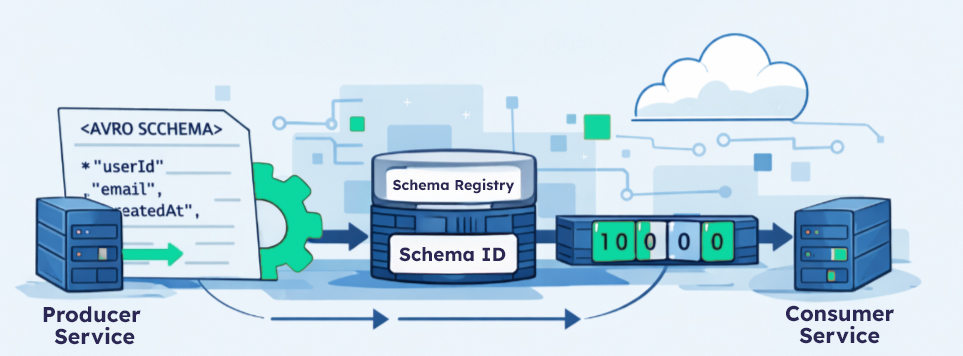
Producer Service
  → Avro serialize (writer schema)
  → Embed schema ID
  → Publish to queue

Consumer Service
  → Read schema ID
  → Fetch schema from registry
→ Avro deserialize (reader schema)A schema registry (internal or third-party) is assumed. Without one, operational complexity increases dramatically.
Walkthrough: Real Schema Evolution
Let’s walk through a realistic evolution scenario.
Step 1: Initial Schema (v1)
We start with a simple UserCreated event.
{
  "type": "record",
  "name": "UserCreated",
  "namespace": "com.example.events",
  "fields": [
    { "name": "userId", "type": "string" },
    { "name": "email",  "type": "string" },
    { "name": "createdAt", "type": "long" }
  ]
}This schema is registered and assigned schema ID = 1.
Java Producer (v1)
Schema schema = new Schema.Parser()
.parse(new File("user_created_v1.avsc"));
GenericRecord record = new GenericData.Record(schema);
record.put("userId", "123");
record.put("email", "user@example.com");
record.put("createdAt", System.currentTimeMillis());
ByteArrayOutputStream out = new ByteArrayOutputStream();
DatumWriter<GenericRecord> writer =
new GenericDatumWriter<>(schema);
BinaryEncoder encoder =
EncoderFactory.get().binaryEncoder(out, null);
writer.write(record, encoder);
encoder.flush();
byte[] payload = out.toByteArray();
// publish payload + schema ID (1)Java Consumer (v1)
Schema readerSchema = new Schema.Parser()
.parse(new File("user_created_v1.avsc"));
DatumReader<GenericRecord> reader =
new GenericDatumReader<>(readerSchema);
BinaryDecoder decoder =
DecoderFactory.get().binaryDecoder(payload, null);
GenericRecord record = reader.read(null, decoder);
String email = record.get("email").toString();So far, nothing special.
Where Does user_created_v1.avsc Come From?
The user_created_v1.avsc file is not generated at runtime. It is a source-controlled Avro schema definition that acts as the canonical contract for the event.
In practice, teams treat .avsc files the same way they treat API definitions or database migrations.
Creating an Avro Schema File
An Avro schema is a plain JSON document.
The initial user_created_v1.avsc file is typically created manually by the team that owns the event.
Example:
{
  "type": "record",
  "name": "UserCreated",
  "namespace": "com.example.events",
  "fields": [
    { "name": "userId", "type": "string" },
    { "name": "email",  "type": "string" },
    { "name": "createdAt", "type": "long" }
  ]
}
This file is saved as:
schemas/user_created.avsc
(Notice that we do not version the filename in production systems. Versioning is handled by the schema registry.)
How the Schema Enters the System
The lifecycle usually looks like this:
- Author the schema
- Written by the event-owning team
- Reviewed like any other API change
- Commit to version control
- Stored alongside service code or in a shared schema repository
- Register with the schema registry
- Done automatically during build or deploy
- Compatibility rules are enforced at registration time
- Use the schema at runtime
- Producers serialize using the registered schema
- Consumers resolve schemas dynamically via schema ID
Registering the Schema (Typical Flow)
Most teams do not hand-register schemas.
Instead:
- CI or deployment pipelines register schemas automatically
- Registration fails if compatibility rules are violated
Conceptually:
schema registry:
  register(subject="UserCreated", schema=user_created.avsc)
→ returns schema_idThe application then embeds that schema_id into each message.
How the Schema ID Is Embedded at Runtime
When an Avro schema is registered with a schema registry, it is assigned a numeric schema ID (typically an integer).
At runtime, producers do not guess or hardcode this ID — they retrieve it from the registry and embed it directly into the message payload (or headers).
There are two common patterns.
Pattern 1: Schema ID Embedded in the Payload (Most Common)
In this model, the message payload has two parts:
[ schema_id ][ avro_binary_data ]Wire Format (Conceptual)
+------------+----------------------+
| schema_id  | Avro-encoded payload |
+------------+----------------------+schema_idis typically 4 bytes (int32)- The remaining bytes are standard Avro binary data
- Consumers read the ID first, then resolve the schema
This pattern is used by many schema-registry implementations.
Producer Flow at Runtime
At startup (or on first use):
- Load local
.avsc - Register or lookup schema in registry
- Receive
schema_id - Cache
schema_idin memory
At message send time:
- Write
schema_idto output buffer - Serialize record using Avro binary encoder
- Publish bytes to queue
Java Example: Embedding Schema ID Manually
This example shows exactly how a producer embeds the schema ID.
Producer Setup
Schema schema = new Schema.Parser()
    .parse(new File("schemas/user_created.avsc"));

// Step 1: register schema and get ID
int schemaId = schemaRegistryClient.register(
    "UserCreated",
    schema
);In practice:
- This happens once at startup
schemaIdis cached- Registration is idempotent
Producer Serialization
GenericRecord record = new GenericData.Record(schema);
record.put("userId", "123");
record.put("email", "user@example.com");
record.put("createdAt", System.currentTimeMillis());

ByteArrayOutputStream out = new ByteArrayOutputStream();

// Step 2: write schema ID first
DataOutputStream dataOut = new DataOutputStream(out);
dataOut.writeInt(schemaId);

// Step 3: write Avro payload
DatumWriter<GenericRecord> writer =
    new GenericDatumWriter<>(schema);

BinaryEncoder encoder =
    EncoderFactory.get().binaryEncoder(out, null);

writer.write(record, encoder);
encoder.flush();

byte[] message = out.toByteArray();
// publish message to queueAt this point, the payload contains both:
- The schema identifier
- The serialized Avro record
Consumer Flow at Runtime
Consumers reverse the process.
Consumer Deserialization
ByteArrayInputStream in = new ByteArrayInputStream(message);
DataInputStream dataIn = new DataInputStream(in);

// Step 1: read schema ID
int schemaId = dataIn.readInt();

// Step 2: fetch writer schema
Schema writerSchema =
    schemaRegistryClient.getById(schemaId);

// Step 3: deserialize using reader schema
DatumReader<GenericRecord> reader =
    new GenericDatumReader<>(writerSchema, readerSchema);

BinaryDecoder decoder =
    DecoderFactory.get().binaryDecoder(in, null);

GenericRecord record = reader.read(null, decoder);This is where schema evolution happens:
- Writer schema = producer schema
- Reader schema = consumer schema
- Avro resolves differences automatically
Pattern 2: Schema ID in Message Headers
Some systems place the schema ID in message headers instead of the payload:
headers:
  schema-id = 42
payload:
Avro binary dataThis has trade-offs:
- Easier inspection
- Requires header support in the messaging system
- Payload alone is no longer self-describing
Payload-embedded IDs are more portable.
Why Applications Don’t Hardcode Schema IDs
Schema IDs:
- Are assigned by the registry
- Can differ across environments
- Must remain opaque to application logic
Best practice:
- Lookup at startup
- Cache aggressively
- Refresh only on schema changes
Why This Design Scales
This approach:
- Avoids version negotiation between services
- Allows consumers to lag behind producers
- Enables replay of old messages safely
- Decouples schema evolution from deployment timing
The schema ID is the link between binary data and meaning.
Key Takeaway
When people say “the schema ID is embedded in the message”, what they mean is: The producer writes the registry-assigned schema ID into the message before the Avro payload, and the consumer reads it first to resolve the correct schema. Once you understand this, Avro’s evolution model becomes concrete rather than magical.
Why You Should Not Generate Schemas from Code
Avro supports generating schemas from Java classes, but we avoid this for event messaging.
Reasons:
- Code-first schemas couple schema evolution to implementation details
- Refactoring Java code can accidentally break schemas
- Multi-language consumers become second-class citizens
Instead, we follow schema-first development:
- Schema is the contract
- Code adapts to the schema, not the other way around
How Schema Versions Are Managed
Even though the blog uses names like v1 and v2 for clarity:
- The schema registry tracks versions
- Producers and consumers do not need to know version numbers
- Schema evolution is handled automatically via compatibility rules
In production, your code typically loads:
new Schema.Parser().parse(
    getClass().getResourceAsStream("/schemas/user_created.avsc")
);That schema may already have multiple historical versions registered.
Key Takeaway
The .avsc file is:
- Hand-authored
- Source-controlled
- Reviewed
- Versioned by the registry
- Treated as a public API
Once teams adopt this mindset, schema evolution becomes predictable instead of risky.
Step 2: Evolving the Schema (v2)
Now we want to:
- Add
displayName - Make it optional
- Keep existing consumers working
Updated Schema (v2)
{
  "type": "record",
  "name": "UserCreated",
  "namespace": "com.example.events",
  "fields": [
    { "name": "userId", "type": "string" },
    { "name": "email",  "type": "string" },
    { "name": "displayName",
      "type": ["null", "string"],
      "default": null
    },
    { "name": "createdAt", "type": "long" }
  ]
}This schema is backward compatible:
- Old consumers don’t know about
displayName - New producers can safely emit it
Registered as schema ID = 2.
Java Producer (v2)
record.put("displayName", "Jane Doe");
// other fields unchangedThat’s it.
No version checks. No feature flags. No branching logic.
Java Consumer (Still v1 Schema)
The consumer still uses user_created_v1.avsc.
Avro automatically:
- Ignores the unknown
displayNamefield - Resolves fields by name, not position
No redeploy required.
Step 3: Updating the Consumer (v2)
Later, the consumer updates to v2.
Object displayName = record.get("displayName");

if (displayName != null) {
    log.info("Display name: {}", displayName.toString());
}Old messages (written with v1):
- Have no
displayName - Avro injects the default value (
null) - No deserialization failure
This is safe forward compatibility.
What Would Break Compatibility?
Examples of dangerous changes:
- Removing
emailwithout a default - Renaming
userIdwithout an alias - Changing
string→int - Reinterpreting field meaning
Schemas are APIs. Breaking changes must be treated as such.
Generic vs Specific Records
Avro supports two styles:
GenericRecord
- Runtime schema resolution
- Flexible and dynamic
- Common in data platforms and shared libraries
SpecificRecord
- Code generation
- Compile-time safety
- Better IDE support
In messaging systems with independent deployment cycles, GenericRecord is often the safer default.
Operational Best Practices
1. Enforce Compatibility in the Registry
Set compatibility rules:
BACKWARDfor event streams- Fail fast on incompatible changes
2. Version by Evolution, Not Names
Avoid:
UserCreatedV1
UserCreatedV2
Prefer:
UserCreated (evolved schema)
Versioning is implicit in the registry.
3. Treat Schemas as First-Class Artifacts
- Code review schema changes
- Store schemas alongside code
- Test schema compatibility in CI
Avro excels when:
- Events are long-lived
- Multiple teams consume the same data
- Throughput and payload size matter
- Consumers evolve independently
It is less suitable for:
- Ad-hoc scripts
- Human-readable messaging
- Extremely simple, short-lived systems
Final Thoughts
Avro doesn’t just serialize data—it forces discipline.
By making schemas explicit and evolvable, it:
- Prevents silent breakages
- Enables independent service evolution
- Scales better than schema-less approaches
The real cost isn’t Avro itself—it’s failing to treat schemas as APIs.
Addendum: Schema Registry
A schema registry is a service that stores, versions, and enforces compatibility rules for schemas. You don’t need a single “official” one—several mature options exist, and teams choose based on ecosystem fit, operational model, and governance needs.
Below is an overview of commonly used schema registry tools.
De Facto Standard (Kafka-centric)
Confluent Schema Registry
Most widely used implementation
Supports
- Avro (first-class)
- Protobuf
- JSON Schema
Key features
- Per-subject versioning
- Compatibility modes (BACKWARD, FORWARD, FULL, etc.)
- REST API
- Client libraries for Java, Python, Go, .NET
- Tight integration with Kafka clients
Operational model
- Stateful service (typically backed by Kafka)
- Can be run self-managed or via Confluent Cloud
Best fit
- Kafka-based architectures
- Teams that want proven tooling and ecosystem support
Open-Source & Vendor-Neutral
Apicurio Registry
Kafka-compatible, vendor-neutral alternative
Supports
- Avro
- Protobuf
- JSON Schema
- OpenAPI / AsyncAPI (metadata use cases)
Key features
- REST API similar to Confluent’s
- Pluggable storage (Kafka, PostgreSQL, etc.)
- Kubernetes-friendly
- Strong governance and artifact lifecycle features
Best fit
- Open-source-first teams
- Kubernetes-native platforms
- Multi-format schema governance
Karapace
Lightweight, Kafka-compatible registry
Supports
- Avro
- JSON Schema
- Protobuf
Key features
- Compatible with Confluent Schema Registry API
- Simpler deployment model
- Python implementation
Best fit
- Teams wanting Confluent API compatibility without Confluent infrastructure
Cloud-Managed Registries
AWS Glue Schema Registry
AWS-native schema registry
Supports
- Avro
- JSON Schema
- Protobuf
Key features
- Fully managed
- IAM-based access control
- Integrates with Kafka (MSK), Kinesis, and Lambda
- No infrastructure to operate
Trade-offs
- AWS lock-in
- Different APIs and semantics from Kafka-native registries
Best fit
- AWS-centric architectures
- Teams prioritizing managed services
Azure Schema Registry
Azure-native schema registry
Supports
- Avro (primary)
Key features
- Integrated with Event Hubs
- Azure AD authentication
- Managed service
Best fit
- Azure Event Hubs users
- Avro-centric messaging
DIY / Internal Registries (Advanced)
Some teams build internal schema registries using:
- PostgreSQL or DynamoDB for storage
- REST API for registration and lookup
- Git-based schema versioning
- CI-enforced compatibility checks
When this makes sense
- Strong governance requirements
- Nonstandard environments
- Desire for deep customization
When it doesn’t
- Most teams underestimate the complexity
- Compatibility logic is nontrivial
- Tooling ecosystem is harder to replicate
What to Look for in a Schema Registry
Regardless of vendor, a production-ready registry should support:
- Compatibility enforcement
- BACKWARD / FORWARD / FULL
- Immutable schema versions
- Stable schema IDs
- Runtime lookup by ID
- CI/CD integration
- Client library support
If any of these are missing, schema evolution will become fragile.
Practical Recommendation
- Kafka-based systems → Confluent Schema Registry or Apicurio
- Cloud-native managed stacks → AWS Glue or Azure Schema Registry
- Open-source + Kubernetes → Apicurio or Karapace
- Avoid DIY unless you have a strong, explicit reason
Key Takeaway
A schema registry is not just a database of schemas — it is the enforcement point for data contracts.
The choice of tool matters less than:
- Enforcing compatibility rules
- Treating schemas as APIs
- Integrating registry checks into CI/CD
Once those are in place, Avro-based messaging scales cleanly across teams and services.
Relevant posts

Navigation through the Jungle of Event-Based Systems: Choosing the Right Message Broker
Navigating through the dense jungle of event-based systems can be daunting, especially when trying to decide between different message brokers...

Making UX decisions: A guide for product builders
Are you juggling countless stakeholder demands with a ticking clock? Curious about how to make lightning-fast UX decisions without sacrificing...

Mastering Apache Kafka Monitoring: Key Metrics and Tools for Reliable Platform Performance
Imagine a critical e-commerce platform that relies on Apache Kafka to process orders, track inventory, and manage real-time notifications. Suddenly,...

VMware AVI Load Balancer Licensing – Simply explained
You plan to implement VMware AVI Load Balancer (AVI) as a new LoadBalancing or WAF solution, but you have problems...

Scaling with NSX-T and ALB beyond vNIC limits
When using NSX-T for networking in combination with NSX ALB for load balancing in the vSphere IaaS Control Plane, the...
Testing with Jest: Write a quick test today, prevent a huge pain tomorrow!
Many great engineers secretly dislike writing tests, but testing isn’t about achieving perfection—it’s about avoiding potential disasters. It’s less about...
You need to load content from reCAPTCHA to submit the form. Please note that doing so will share data with third-party providers.
More Information